UK Passport Photo Maker — Free HMPO-Compliant Online Tool
Drop photo for United Kingdom Passport/Visa
Pre-configured for United Kingdom biometric standards.
HMPO-compliant UK passport photos in seconds. Generate 35×45mm biometric photos for your British passport or UK visa application — 100% free and fully private.

United Kingdom Compliance FAQ
UK Passport Photo Maker — Free HMPO-Compliant Online Tool
Generate 35×45mm UK passport photos that meet every HM Passport Office standard — free, private, and print-ready.
The HM Passport Office (HMPO) has some of the strictest biometric photo standards in the world. Their automated checking system rejects photos based on background tone, head-height ratio, eye clarity, and even shadow intensity. Getting rejected at this stage means a reapplication, additional fees, and weeks of delay.
Our UK Passport Photo Maker is pre-loaded with every HMPO requirement. It automatically applies a cream or light grey background, shows real-time biometric guides for head height (29–34mm within a 45mm frame), and generates a print-ready sheet you can take to any Boots or Post Office — or print at home.
Official UK Passport Photo Requirements (2026)
- Dimensions: 35mm wide × 45mm tall. Exact — no rounding.
- Head Height: Crown to chin must be 29–34mm within the photo.
- Eye Position: Eyes must be 22–33mm from the bottom of the photo.
- Background: Plain cream or light grey. (Not brilliant white — slightly off-white.)
- Expression: Neutral, with mouth closed. Both eyes fully open and clearly visible.
- Glasses: Not accepted since 2018. Remove all eyewear.
- Head Coverings: Only for documented religious or medical reasons.
- Print Quality: 300 DPI minimum. No blurring, pixelation, or red-eye.
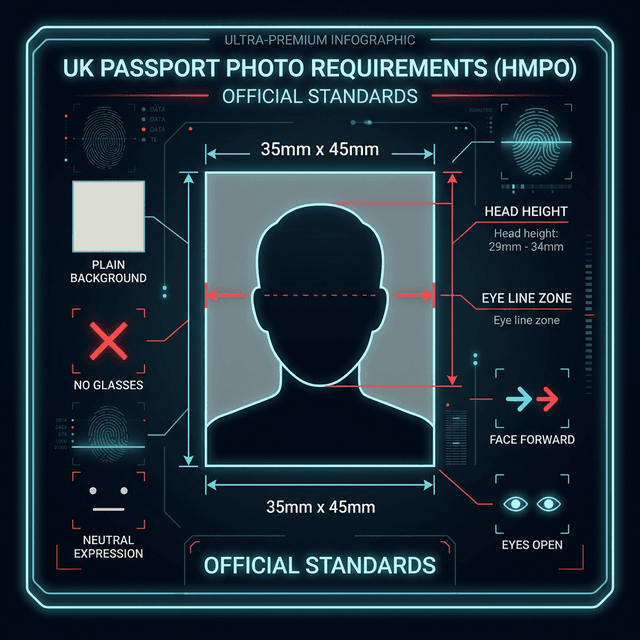
The HMPO's automated checking system validates every submitted photo against these pixel-level measurements before a human ever sees it. Our biometric overlay guides you to hit the exact green zone — ensuring your photo passes the computer check on the first try.
How to Take a UK Passport Photo at Home
Four steps to a compliant photo with just your smartphone.
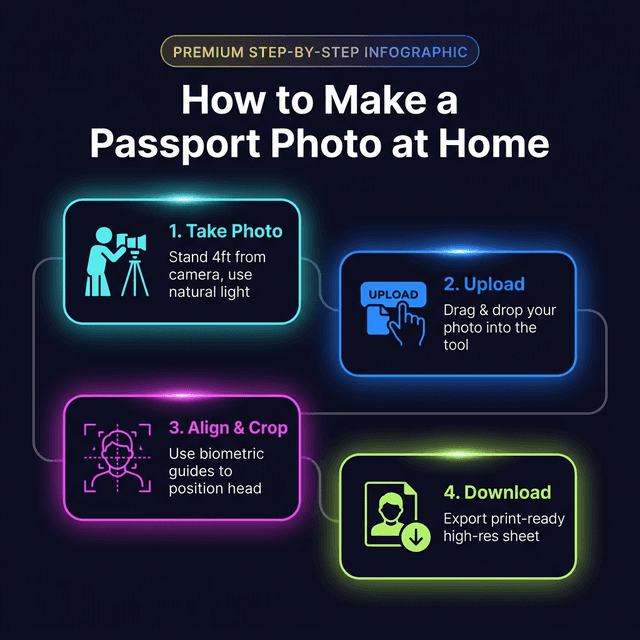
Taking your own UK passport photo is straightforward when you know the rules. Follow these steps for a first-time approved result:
- Choose the right background: A cream or light grey wall works best. If you only have a white wall, our AI Background Remover adds a compliant shade automatically. Avoid dark walls, patterned wallpaper, or anything with shadows.
- Lighting: Natural window light gives the most even result. Face the window directly. Avoid standing with a window behind you — this creates facial shadows that trigger HMPO rejection.
- Camera setup: Use the rear camera from 3–4 feet away. This minimises facial distortion. Get a family member to help, or use a tripod with a timer.
- Expression and posture: Look straight into the camera. Keep a neutral expression with a closed mouth. Your full face from the top of your head to your chin must be visible — no hair covering the eyebrows.
For babies and toddlers, lay them on a white sheet and photograph from above. Crop out the sheet background in our tool. Ensure eyes are clearly open — HMPO's automated system checks eye clarity even for infant passport photos.
UK Passport Photo: Comparing Your Options
Why our online tool gives you the best-value, most-private result.
| Option | img.ubify | Boots / Post Office | Professional Studio |
|---|---|---|---|
| Cost | Free | £9.95 | £20–£40 |
| Privacy | Total (local) | In-store processing | Shared storage |
| Speed | Under 1 minute | 15–30 minutes | By appointment |
| HMPO Compliance Check | Automated biometric overlay | Human judgement | Human judgement |
| Print Options | Multiple layouts (PDF) | 2 prints | Varies |
| Works for UK Visa / BRP | Yes | Yes | Yes |
High-street photo booths in the UK are convenient but expensive. More importantly, they do not offer the biometric overlay that our tool provides. The technician at the till does their best, but they have no access to the HMPO's automated checking criteria. Our tool uses the same dimensional standards that HMPO's system checks — validated before you print.
For digital submissions (online passport renewals via the Gov.uk portal), use our high-resolution JPG output. The official HMPO digital photo requirements state the file should be at least 300px wide — our output at 300 DPI exceeds this by a significant margin.
UK Visa & BRP Photos — Same Tool, All Covered
35×45mm works for most UK visa categories and the Biometric Residence Permit.
The 35×45mm biometric standard is used across the majority of UK immigration documents, not just the British passport. Our tool covers them all:
- UK Passport: Standard 35×45mm, cream/light grey background.
- UK Visa (All Categories): 35×45mm, white or off-white background.
- Biometric Residence Permit (BRP): 35×45mm, standard biometric format.
- Indefinite Leave to Remain (ILR): 35×45mm HMPO standard.
- Certificate of Entitlement: 35×45mm, same rules as passport.
For any UK visa application, always confirm the exact background colour requirement on the specific visa guidance page. Most accept white; the HMPO passport standard is cream or light grey. Our AI background tool lets you switch between options instantly.
If you need photos for both a UK passport and a UK visa at the same time, download both versions (cream background for passport, white for visa) in a single session. Use our Image to PDF tool to stitch them into one submission-ready document.
Biometric Privacy — Your UK Passport Photo Stays Local
Zero-Server architecture means your data never leaves the UK (or wherever you are).
Uploading your passport photo to a third-party server raises real data protection concerns. Under the UK GDPR, your biometric data — which a facial photograph constitutes — must be handled with explicit consent and purpose limitation. Many online passport photo tools do not meet these standards.
img.ubify's Zero-Server architecture means your photo never travels anywhere. The background removal, crop calculation, and print layout rendering all happen inside your browser's own sandboxed environment. We have no means to see, store, or process your image. This is the gold standard for biometric privacy.
🛠 You Might Also Need
Ready to Create Your UK Passport Photo?
Skip the Boots queue and the £10 fee. Drop your portrait into the HMPO-compliant UK Passport Photo Maker above — and have a print-ready result in under a minute.
ubify image team
We are a group of image processing enthusiasts and researchers who believe in asset sovereignty. Every tool here is built with ❤️ to give you high-fidelity results while keeping your data strictly in your control.